Finding the right WordPress web development partner is crucial for a successful website. We’ve designed this guide to walk you through a step-by-step process for selecting a WordPress / website design agency or developer, tailored to the UK market, but in reality, it’s perfect for businesses based anywhere in the world.
We cover key evaluation criteria (skills, experience, sector fit, support, security, performance, accessibility, SEO, training, pricing, contracts and SLAs) and offer practical tools like comparison tables, checklist tables, and a process flow diagram.
Our guide also provides an SEO-optimised framework (title tag, meta description, H1, URL slug, keywords, internal links, schema) that you should esure that your choosen WordPress developer uses, plus a sample project brief template and eveluation – to help make shortlisting an agency easier. UK-specific pricing guidance data has been pulled together from authoritative sources (including third-party case studies and industry reports), so it should be pretty up to date (latest data 2026).
Introduction: Choosing the Right WordPress Website Company for Long-Term Success
Choosing a WordPress website company is a strategic decision that can make or break your online presence. WordPress is a powerful, widely-used CMS (powering roughly 40% of all websites), but building a site that’s secure, fast and truly fit-for-purpose requires expert help. A good WordPress partner will offer web design and development skills, search engine optimisation (SEO) knowledge, and ongoing support. This guide will help you assess potential partners and make an informed choice that fits your organisation’s needs and budget.
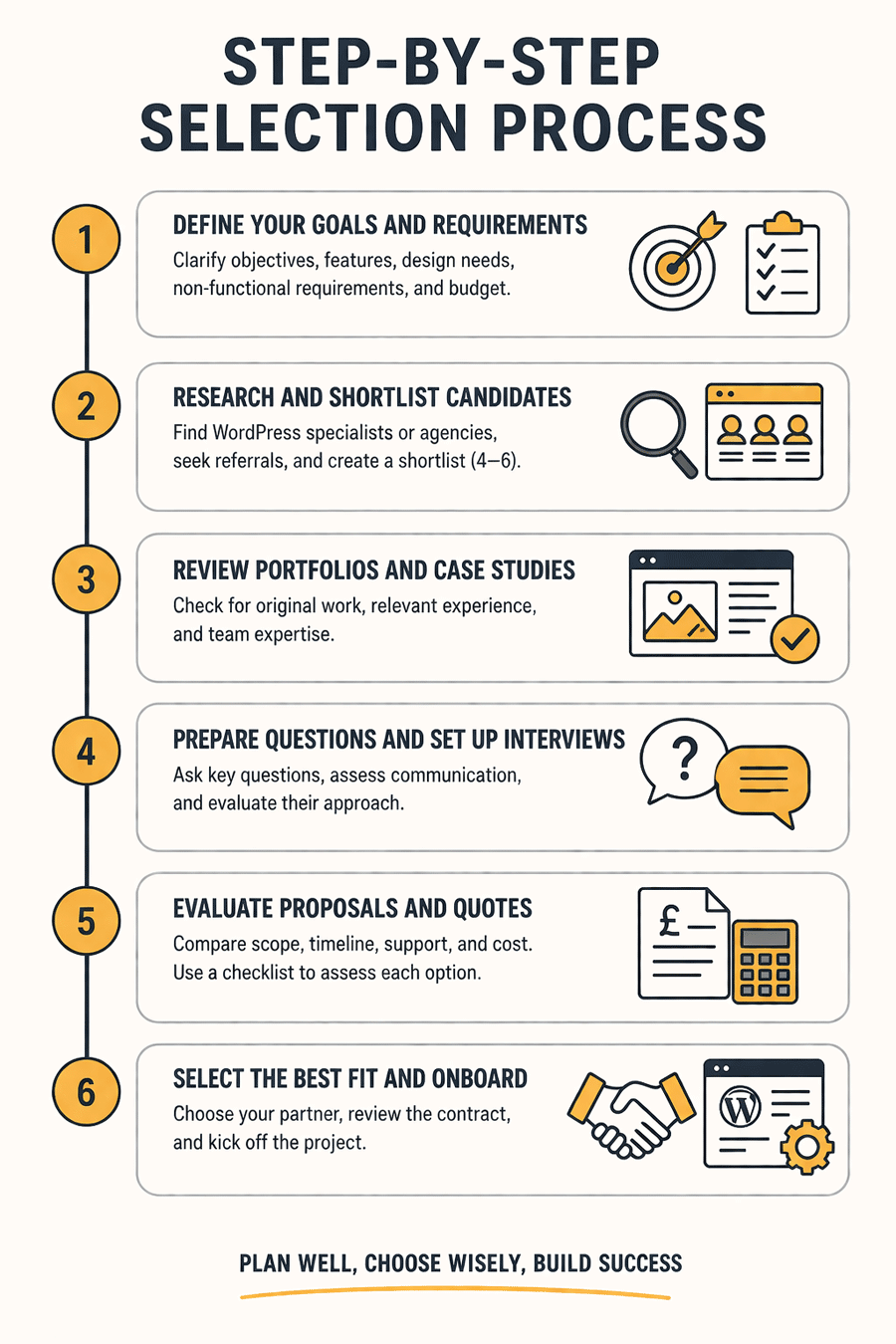
Step-by-Step Selection Process
-
Define Your Goals and Requirements. Clarify what you want from the website (e.g. brochure site, eCommerce, lead generation) and set a budget range. Outline functional and design requirements (content pages, forms, branding, etc.), plus non-functional needs (performance targets, security, accessibility, CMS training, and SEO support). Having a clear brief up-front will guide the rest of the process.
-
Research and Shortlist Candidates. Look for WordPress specialists and digital agencies that serve UK clients, preferably in your industry. Seek referrals or search online for firms with strong portfolios and positive reviews. Focus on companies that showcase relevant work – e.g. architecture, construction or built-environment clients if that’s your sector. Prepare an initial shortlist (4–6 options) of agencies or freelancers to contact.
-
Review Portfolios and Case Studies. Examine each company’s previous work carefully. A reputable WordPress developer will have a portfolio or case studies with original designs tailored to each client. Avoid providers who rely on cookie-cutter themes or templates – you should verify that their examples are unique and not just repackaged free themes. Also, check for staff or team profiles to gauge their experience (designers, developers, project managers) and years in business.
-
Prepare Questions and Set Up Interviews. Contact the shortlisted providers and arrange calls or meetings. Ask open-ended questions to assess their expertise and approach (see the “Questions to Ask” section below). Evaluate their communication style and responsiveness. A good agency will listen closely, explain things clearly, and propose solutions rather than just selling services. Beware of providers who are evasive or make all decisions for you – collaboration and clarity are important.
-
Evaluate Proposals and Quotes. After your calls, request written proposals or estimates. Compare them not just on price, but on deliverables. Does each quote include a clear scope (number of pages, features, integrations) and timeline? Look for details on support, training and maintenance options, as well as contracts and service levels (SLA). At this stage, it can help to use a shortlisting checklist (see below) to compare candidates against your criteria.
-
Select the Best Fit and Onboard. Choose the company that best meets your needs and budget. Review the contract or statement of work carefully, ensuring it includes all agreed terms (scope, milestones, payment schedule, intellectual property, support guarantees, etc. – see key clauses below). Then begin the onboarding process: hold a project kickoff, transfer access to content and accounts, and collaborate on the design brief. A structured flow (see diagram) helps ensure nothing is overlooked.
Key Evaluation Criteria
When comparing WordPress providers, consider the following factors:
-
Skills & Experience: Ensure the team has strong technical skills in WordPress, PHP, HTML/CSS and relevant plugins or frameworks. Check their portfolio for similar project types and quality of design. Ask about certifications or long-term WordPress experience (e.g. years in business). Avoid companies that primarily use non-WordPress builders or have limited technical depth.
-
Relevant Sector/Niche Fit: Does the agency have experience in your industry? Specialists in your sector (e.g. architectural, engineering, or construction firms) will better understand your needs. They should be able to showcase studies or references from similar clients, or at least quickly grasp your target audience. For example, if you need an eCommerce store, the developer must know WooCommerce or a similar solution. If they lack relevant expertise (e.g. have never built a property site before), they may struggle to deliver effectively.
-
Design and Development Approach: Look for a partner that emphasises custom design, user experience and mobile responsiveness. They should use modern, well-coded themes or create bespoke designs – not just apply a pre-made template. Ask whether they test websites for security, SEO and performance as part of the development process. In other words, will they build with best practices in mind (fast-loading, clean code, on-page SEO) or just hand you the “raw” site?
-
Project Management & Communication: A dedicated project manager or main point of contact is a valuable asset. Good agencies assign someone to coordinate designers, developers and content writers, and to keep you updated. Confirm who will be your contact and how often they report progress. Communication should be timely and transparent: you need to feel confident that you can reach someone with questions. Check if the company provides support after launch (updates, patches, troubleshooting) or if that’s extra.
-
Support, Maintenance & Training: Post-launch support is often neglected. Clarify what support packages are available – e.g. monthly maintenance plans, emergency fixes, or just ad-hoc hourly rates. If you won’t maintain the site yourself, ask what training they provide on using WordPress and updating content. Freelancers and smaller shops may not offer much beyond handover; agencies often include some training and ongoing help. (Beware: many freelancers “disappear” after delivery, leaving you with a site and nobody to call at 9 pm if it breaks.)
-
Security: WordPress sites must be secured against hacks and malware. Confirm that the company follows security best practices: they should keep core, themes and plugins up to date, use strong passwords, and configure the server securely. Ask if they implement backups and SSL (HTTPS). Reliable agencies will mention “hardening” steps or security checks. (By contrast, an insecure setup is a real risk: research shows 30,000 WordPress sites are hacked every day, mainly via outdated plugins or weak passwords.) If you have sensitive data or strict compliance needs (e.g. GDPR), ensure they understand those requirements.
-
Performance and Optimisation: Slow websites drive visitors away. The developers should optimise site speed by using lightweight themes, minimal plugins, caching and optimised images. Ask if they follow performance guidelines like those on WordPress.org (e.g. up-to-date PHP, gzip compression, CDN support). Check examples of sites they’ve built in terms of load time or Google PageSpeed scores. A quality agency will proactively mention performance (e.g. using caching plugins or image compression) in their proposal.
-
Accessibility: An accessible website reaches more users and avoids legal issues. The developer should design to WCAG standards (alt text for images, proper HTML semantics, keyboard navigation, etc.). Ask if they can make your site accessible or have experience with it. Although less commonly asked, ignoring accessibility can be costly: one study notes that “96% of top websites do not meet basic WCAG standards”, meaning ~16% of users can’t access content. Ideally, they will follow accessibility guidelines, especially if your audience includes public sector or diverse users.
-
SEO (Search Optimisation): Your site won’t help if it can’t be found. A WordPress company should build with SEO in mind: clean, crawlable code, proper tags, fast speed and compatibility with SEO plugins. Ask if they have in-house SEO expertise or partnerships. (Merely having a “pretty site” is not enough – as one guide notes, “SEO-friendly design is a must…hire a company with extensive SEO knowledge”.) Check if they conduct keyword research, set up Google Analytics/Search Console, and optimise images and content structure. Ideally, the quote should include on-page SEO as part of the build.
-
CMS Training: After launch, you’ll need to update and add content. Good providers will include a training session or documentation for your team on using WordPress. Ask if they offer user guides or demos on editing pages, adding blog posts, and managing plugins.
-
Pricing Models: Compare how they charge: fixed price vs. hourly rates vs. retainers. In the UK, freelancers typically quote £500–£3,000 for a small site, while agencies often start around £5,000–£15,000+ for a full-featured business site. (For context, a well-built bespoke site often costs £2k–£5k before adding advanced features.) Offshore development can cut costs by 50–70% (Indian developers may charge $15–$40/hr, vs £50–£150/hr in the UK), but this can impact communication and time zones. Make sure you compare not just the price tag but what’s included: revisions, content creation, testing and post-launch support are often extra.
-
Website Contracts and SLAs: Before signing, review the contract or statement of work carefully. It should clearly spell out the scope (deliverables, features, pages, languages, etc.), timeline/milestones, and payment schedule. Look for clauses on change management (how extra work is handled), warranties (bugs fix for a period after launch), ownership of code/graphics, and termination terms. If hosting or maintenance is included, ensure the SLA (service level agreement) specifies response times for support issues and uptime guarantees. (For example, some hosting providers promise “99.9% uptime” and 24/7 support; see the HostPapa example.) Clarity here avoids nasty surprises later.
View or download our Website Agency Evaluation Scorecard
Questions to Ask Website Design Agencies
When interviewing potential WordPress partners, consider questions like:
-
Experience & Portfolio: “Can you show examples of recent WordPress sites you’ve built? What role did you play (design vs. code)?” Ask about any projects similar to yours. Ensure they had a leading role and that the results are live. Check that their samples are not just theme templates with swapped logos.
-
Technology & Expertise: “Do you build on WordPress itself, or use a custom CMS? Which versions and frameworks do you use?” (They should use current WP versions and standard frameworks.) “Which plugins or tools do you typically use for SEO, caching, security, backups, etc.?” A trustworthy company will list reputable plugins and outline why they use them.
-
Project Process: “How do you manage projects? Will I have a dedicated project manager?” Ask how they handle revisions and approvals. Good agencies will explain their steps (discovery, design mock-ups, development, testing) and keep you involved. They should also clarify their quality assurance: “What testing do you do before launch (e.g. cross-browser, mobile, speed, security)?”.
-
Timeline & Milestones: “What is the typical timeline? Can you meet my deadline?” They should provide a realistic schedule (often 8–16 weeks for a standard site) and milestone dates. Beware firms that give very short timelines for complex work – it could mean corners will be cut.
-
Pricing & Payment: “How do you price this project? Is it fixed or time-based? How do you bill for changes or extra features?” Confirm payment terms (deposit and milestones vs. hourly billing). Understand what happens if the scope grows or requirements change.
-
Support & Maintenance: “What happens after launch? Do you provide ongoing support or training?” Clarify who will handle updates, backups and security patches. If they offer maintenance packages, get details. If not, ask if you can buy support hours.
-
Security Measures: “How will you secure my site? What backup and recovery processes are in place?” A good answer should mention things like SSL certificates, security plugins or firewalls, and a backup schedule. They might refer to standard WordPress hardening best practices (e.g. from official docs) to reassure you.
-
SEO & Performance: “How will you ensure the site is fast and search-optimised?” Listen for answers about image optimisation, caching plugins, SEO-friendly URLs, and on-page SEO work. They should acknowledge the importance of SEO: “SEO-friendly design is a must”.
-
References: “Can you provide references or testimonials from past clients?” Always check reviews and ask if you can speak to a satisfied client. Around 90% of customers trust online reviews as much as personal recommendations. If references aren’t offered, that’s a red flag.
-
Culture Fit & Communication: “How will we communicate during the project? Which tools do you use (email, project management software, etc.)?” Ensure their working style meshes with yours. Regular check-ins and clear updates are important for a smooth partnership.
Comparison of Website Development Service Options
Different approaches to building a WordPress site come with trade-offs. The table below compares six common options – from hiring an in-house developer to outsourcing offshore – summarising pros/cons, UK price ranges, ideal clients and typical timelines.
| Provider Type | Pros | Cons | Typical UK Cost (build) | Best for | Timeline |
|---|---|---|---|---|---|
| In-house Developer | Full-time availability; deep company knowledge; tight control | High annual cost + benefits; one skillset (risk if leaving); recruitment time | ~£35k–50k salary/year | Companies needing ongoing site updates, full control | Ongoing (recruitment ~3–4 months) |
| Freelancer | Low overhead; flexible; may be cheaper for simple sites | Variable quality; no guaranteed support; can disappear; limited capacity | £500–£3,000 per site | Small sites, very tight budgets; one-off projects | ~2–8 weeks (varies) |
| Small Web Agency | Formal process; multiple skills; some support/hosting possible | Higher cost than a freelancer; still limited team; may outsource parts | £3k–£10k+ per site | Small to medium businesses; typical brochure or small e-commerce sites | 6–12 weeks |
| Specialist WP Agency | WordPress expertise; best practices in WP development; likely includes SEO and maintenance options | Can be pricier; smaller agencies may still have limited capacity | £5k–£15k+ per site | Businesses where WordPress is mission-critical, complex content sites or membership sites | 8–16 weeks |
| Full-Service Agency | End-to-end service (strategy, design, marketing); in-house teams (designers, devs, SEOs) | Most expensive; longer timelines; might over-engineer small projects | £10k–£30k+ (or more) | Large businesses, enterprise e-commerce, sites needing integrated marketing | 3–6+ months |
| Offshore Team | Low hourly rates (costs ∼1/3–1/2 of UK rates); large talent pool | Time zone differences, cultural/language barriers; quality can vary widely | £1k–£5k per site (or ~$15–$40/hr) | Very budget-conscious clients; simple sites where native English not critical | ~4–12 weeks (depending on firm) |
Table: Comparison of WordPress development options in the UK. “Cost” refers to a typical project; actual prices vary greatly with requirements.
Shortlisting Checklist
Use the following checklist to compare and score candidates during selection. Tick off items as you verify them in each company’s proposal and interview.
| Checklist Item | Why It Matters |
|---|---|
| Relevant Portfolio & Experience | Shows they’ve built sites like yours. Demonstrates design and technical capability. |
| Proven WordPress Expertise | They should “be all-in with WordPress” (not use a custom CMS) and know core updates. |
| Credible References & Reviews | Third-party feedback confirms quality and reliability. (Nearly 48% of buyers avoid firms with low ratings.) |
| Communication & Availability | Clear, timely communication indicates professionalism. A dedicated project manager is a plus. |
| Clear Scope and Deliverables | Detailed proposal with pages, features, and timeline prevents scope creep. |
| Quality Assurance & Testing | They should test for browser/OS compatibility, performance, and security before launch. |
| Post-Launch Support Plan | Defines who fixes bugs, updates WP core/plugins, and responds to issues after launch. |
| Security & Backup Strategy | Look for mentions of SSL, firewall or security plugins, and regular backups. |
| Performance Optimisation | Check if they optimise images, use caching or CDNs. Should cite performance best practices. |
| SEO Best Practices | Ensures site is built for search: SEO-friendly URLs, meta tags, and analytics setup. |
| Accessibility Considerations | Compliance with WCAG (e.g. alt text, navigation) broadens audience and avoids compliance issues. |
| Training & Documentation | Will they train your staff on WordPress usage and hand over any necessary documentation? |
| Contract Terms (SLA, IP, Payments) | Contract should cover IP ownership, payment terms, termination, and Service Level Agreement. |
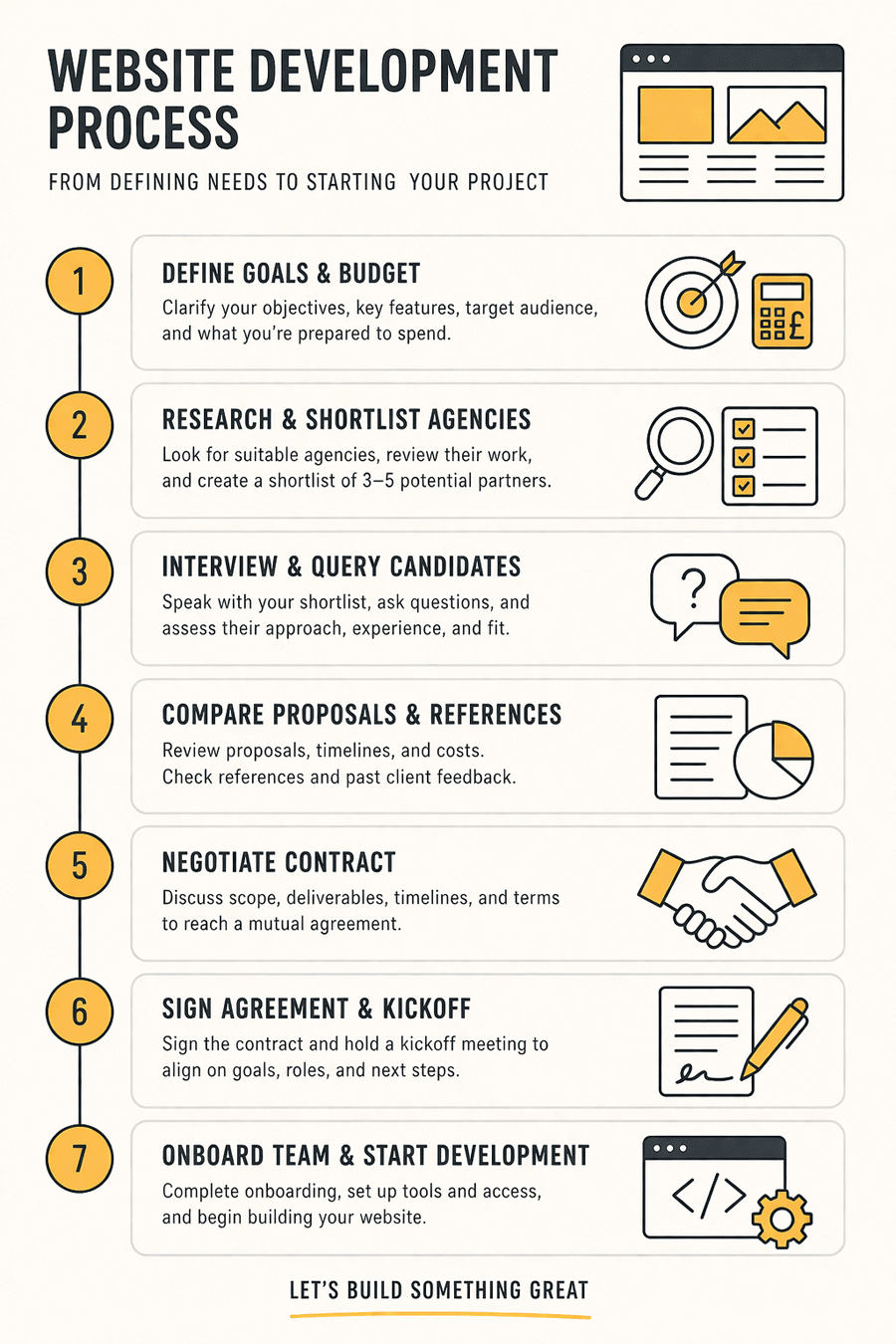
Website Onboarding Flowchart
The diagram below outlines a typical process for selecting and onboarding a WordPress partner. This flowchart helps visualise the steps from defining needs to starting the project.
Research & shortlist agencies
Interview & query candidates
Compare proposals & references
Negotiate contract
Sign agreement & kickoff
Onboard team & start development
Sample WordPress Website Project Brief Template
When seeking proposals, providing a clear project brief helps agencies give accurate bids. A concise brief might include:
- Project Overview: Summarise your business, website purpose (brochure, eCommerce, blog, etc.) and audience.
- Objectives & Success Metrics: What should the site achieve (e.g. leads per month, online sales targets)?
- Scope of Work: List features/pages needed (e.g. home, about, contact forms, product catalogue, blog). Include any integrations (payment gateways, CRM, APIs).
- Design Requirements: Brand guidelines, preferred style or examples, and mobile responsiveness.
- Technical Requirements: Hosting setup (shared, dedicated, WP-managed), performance expectations, security needs (HTTPS, logins), SEO goals, and compliance (e.g. accessibility or data protection).
- Content: Who will provide text/images? Will copywriting or photography be required?
- Timeline: Desired launch date and any critical milestones.
- Budget & Constraints: Outline your budget range and any hard constraints.
- Roles & Responsibilities: Who on your team will liaise with the agency, and who handles approvals.
Providing this detail up-front helps agencies respond accurately and shows you are organised.
View and download our Website Evaluation Scorecard
Key Contract/SOW Clauses
Before agreeing to terms, ensure the contract or Statement of Work covers these essential points:
- Scope of Work & Deliverables: Clearly define what will be delivered (pages, features, revisions). Anything not included should be noted as out of scope or subject to extra cost.
- Payment Terms: State total cost, payment schedule (e.g. deposit, milestone payments, final payment). Include conditions for payments (e.g. work-completed signoff).
- Timeline & Milestones: Specify delivery dates or ranges for drafts, revisions, and launch. Define penalties or handling of delays if needed.
- Intellectual Property: Clarify that you will own the final website code, design, content, and any custom graphics once paid. Often, the agency retains ownership of pre-built modules or licensed assets, so this should be stated.
- Confidentiality: If sensitive information is shared, include an NDA or confidentiality clause.
- Warranties & Support: Detail any guarantee period after launch (e.g. bug fixes for X months at no extra cost). Define what maintenance or support is included (and what costs extra).
- Liability & Indemnity: Limit the agency’s liability and clarify any indemnification (for example, if a third-party plugin causes issues).
- Term and Termination: Conditions under which either party can terminate (e.g. breach of contract, non-payment), and what happens to code and data in that case.
- Service Level Agreement (if hosting/support is provided): Uptime guarantee, response times for support requests, routine update schedules, backup retention details.
- Change Control: How will changes or additions to scope be approved and billed? (Ideally, all change requests should go through a documented change-order process.)
A professional agency should provide a written contract or Scheme of Work that includes the above, rather than relying on informal emails.